Having an option to run multiple accounts, testing locations, or isolating identities from a single machine is an indispensable task for affiliate marketers, media buyers, and social media managers. You can do this simply by combining a high-quality proxy and an anti-detect browser. This guide will demonstrate the reasons why dolphin anty is the best choice, and also introduce the linking process with the leading proxy provider, Proxy4U, this way, every profile is kept clean, isolated and is prepped for scaling.
Why use an anti-detect browser plus a premium proxy?
An anti-detect browser such as dolphin anty that can let you create and fully utilize the cloud, based on your individual needs and preferences, of course, at the same time keep cookies, storage, fingerprinting data, and network identity different for each profile, is like a dolphin that constantly changes its profile and on top of that, makes the changing unique to every profile it creates. This distinctive feature is necessary for managing several accounts on different platforms such as Amazon, eBay, Shopify, ad networks, and social sites without tracking or contamination of data.
By connecting dolphin anty to a reliable proxy provider you will get:
- Location control: Test geo-specific content or run accounts tied to specific countries.
- IP isolation: Keep each profile’s IP separate to prevent account linking.
- Scalability: Run many profiles from one device without triggering platform anti-fraud systems.
Why choose Proxy4U
As with the comparison of people, not all proxy vendors are the same. Proxy4U, a name known for its sheer variety of proxies, including residential, data center, and mobile on pay-as-you-go billing model, is certainly one of these. This implies no monthly commitments and a user-only payment method, which is the best flexibility testing, scaling, and wasted money. Proxy4U is also showcased as being reputable on review sites and it encourages users to validate the service through a free trial before making any commitments.
Proxy4U is the right place for you to go for direct and simple connection to all their plans and trials.
Step-by-step: Configure a residential proxy in Proxy4U
A typical arrangement is the residential proxy associated with a specific country and comes with either sticky or rotating session options as per your requirements. The overall process is:
- Create an account and claim the free trial.
- Choose proxy type: residential for realism, data center for speed, mobile for highest trust.
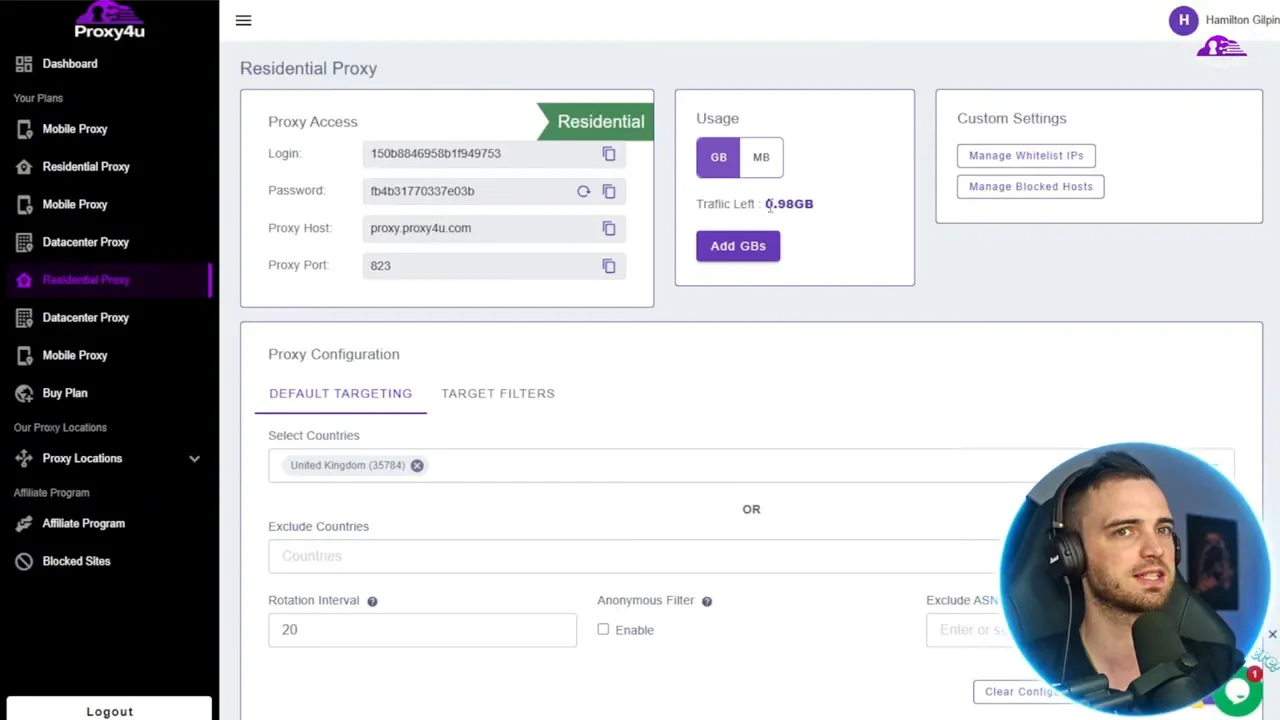
- Select countries or exclude countries as required—pick the exact region you need (for example, United Kingdom).
- Decide rotation behavior. A rotation interval assigns new IPs periodically within the same country; a sticky session keeps the same IP for a longer duration. For account management, sticky sessions are often safer.
- Save the configuration and note the login credentials and proxy endpoint shown on the dashboard. This is what you will paste into dolphin anty.
Step-by-step: Set up a profile in dolphin anty
When the proxy is done, set up your profile in dolphin anty:
- Install and open dolphin anty.
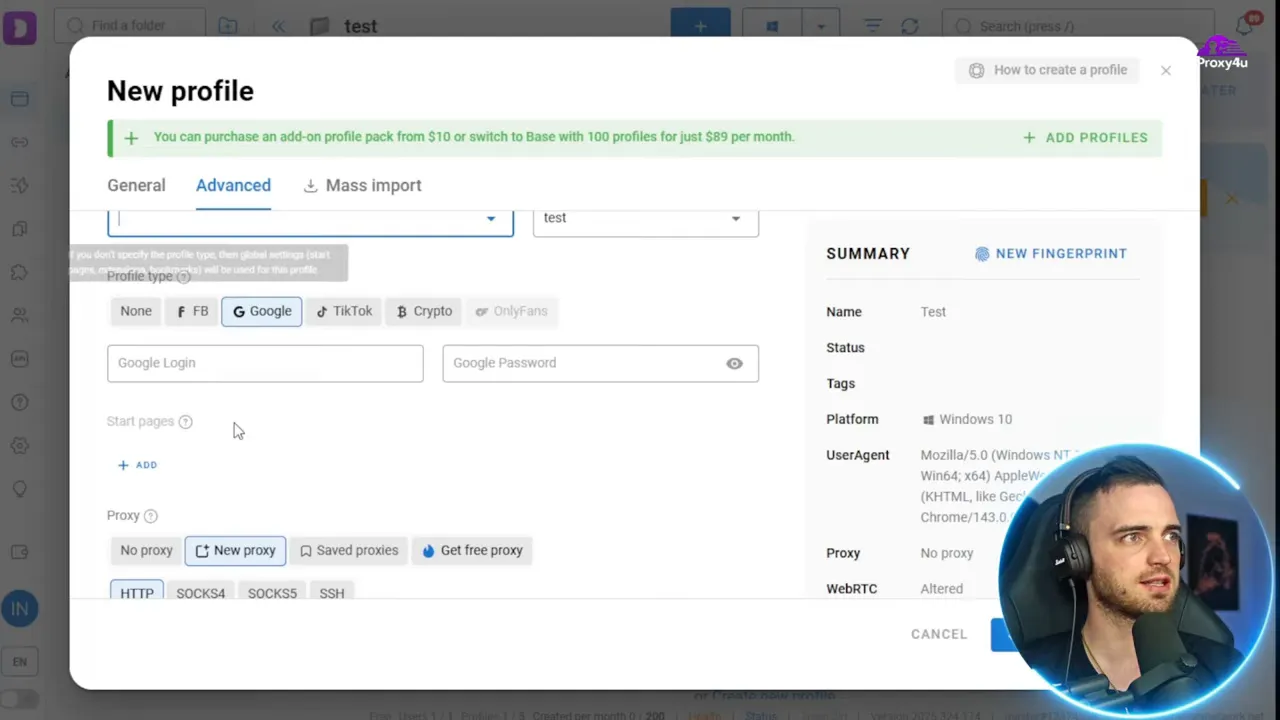
- Click the Plus button to create a new profile and give it a descriptive name.
- Under profile type select the appropriate account model and then choose New Proxy → HTTP (or the protocol your proxy supports).
- Paste the proxy login string from Proxy4U into the proxy field. Wait for the connection test to complete; it should show the country and IP if successful.
- Optional: upload cookie files, select the operating system fingerprint (for example Windows 10), set timezone, cores, and other device properties to match the profile’s intended behavior.
- Create and then Start the profile. A new browser window will launch with that isolated profile and proxy active.
Tips for a robust setup
- Match OS and timezone: Ensure the OS, timezone, language, and proxy location align with the account’s expected footprint to reduce suspicious signals.
- Prefer residential proxies for account work: Residential IPs better mimic real users and lower ban rates on most social and e-commerce platforms.
- Keep credentials private: Never paste sensitive credentials into shared places; use the proxy dashboard to manage access.
- Test before scaling: Use Proxy4U trial credits to verify performance and detection risk before creating dozens of profiles.
Putting it all together
The use of dolphin anty along with a premium proxy service like Proxy4U in fact, are one of the full-featured, efficient solutions for handling multiple online identities without the risk of account bans. Take care of the proxy settings, ensure that the profile fingerprints are matched with the same proxy location, and it is advisable to select sticky residential sessions when managing user accounts that need to remain the same.
For those who wish to set up a firm, scalable base for affiliate marketing, ad testing, or managing multiple social accounts, aligning dolphin'inty with a reputable proxy provider, and following the steps given in the configuration guide.
Why not go ahead and do it? Begin with Prox4Uhere to perform a proxy run test, and then integrate these stabililized endpoints into dolphin anty.


