If you want a secure, scalable way to run multiple Android accounts in the cloud, duoplus is the platform to watch. In this guide I walk you through the world’s first anti-detect Android cloud phone on duoplus and show exactly how to link a residential proxy from Proxy4U so your IP looks local anywhere in the world. This tutorial is focused on practical steps and security best practices for 2025 and beyond.
DuroPLUS cloud phone overview
duoplus provides a cloud Android 15 phone that simulates real ARM devices with worldwide GPS and SIM data to mirror local operational environments. That means you can:
- Run multiple accounts simultaneously without detection.
- Deploy authentic ARM chip phones globally from the cloud.
- Manage apps with one-click install, reskin, and sharing.
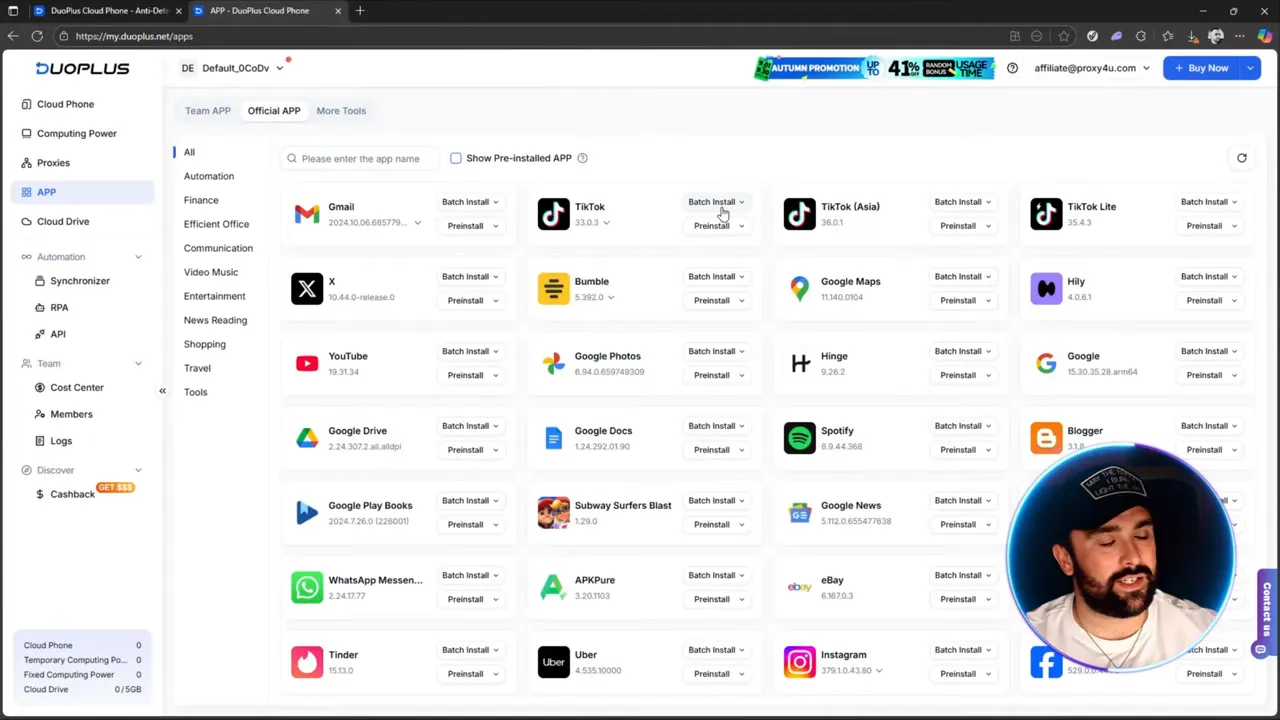
The duoplus interface gives you a central dashboard with your cloud phones, a pre-installed app store (TikTok, Snapchat, Maps, etc.), cloud drive, and a proxy integration section so you can lock down your IP identity before you start logging into accounts or scraping data.
Why proxies are essential in 2025 and 2026
Securing your public IP is the number one priority for anyone running multiple accounts or doing geo-targeted scraping. A residential proxy lets you:
- Appear to be located in another country (Netflix USA, Brazil, etc.)
- Avoid geo restrictions and reduce account risk by matching device location with IP location
- Rotate IPs to limit linkability between sessions
For reliable residential proxies I recommend Proxy4U as a superior option because of its large IP pools, pay-as-you-go flexibility, and proven reliability for analysts and e-commerce pros. Learn more from Proxy4U.
Proxy4U features you should use
- Multiple proxy types: residential, data center, and mobile.
- Pay-as-you-go billing so you only pay for the traffic you use.
- Country targeting and large IP pools (for example, Brazil with 75,000+ IPs).
- Protocols available: HTTP, HTTPS, and SOCKS5.
- Sticky and rotating IP options with recommended rotation intervals.
Step-by-step: Add a residential proxy to duoplus
Follow these steps to connect a Proxy4U residential proxy to your duoplus cloud phone.
- Choose residential proxies on your Proxy4U dashboard. Use geographic targeting if you need a specific country.
- Decide rotation settings. Proxy4U recommends not exceeding a 30 minute rotation interval. A good default is 20 minutes for a balance of security and session stability.
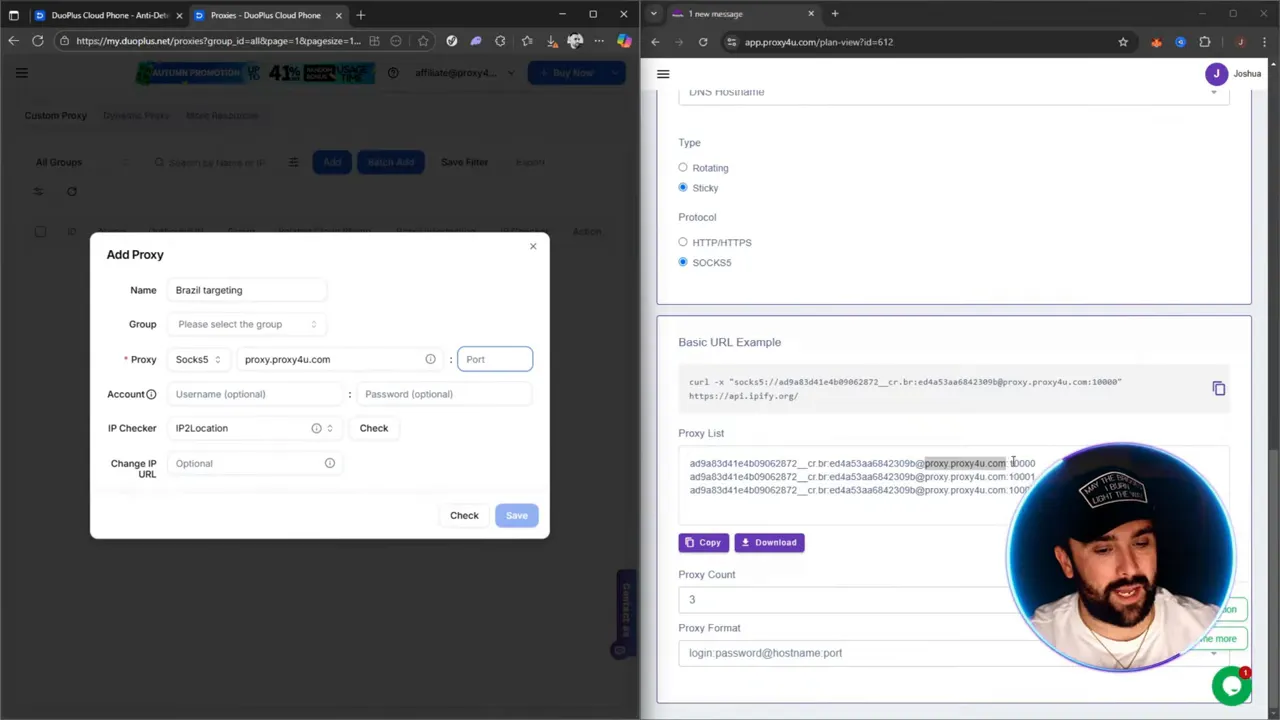
- Retrieve your proxy credentials. Proxy4U will give you a login string that looks like this pattern: username:password@proxy.proxyforyou.com:10000. You will need to split that into fields when adding to duoplus.
- Open duoplus and go to the proxies section. Click Add to create a new proxy entry for the cloud phone.
- Fill the fields in duoplus as follows:
- IP or domain: copy the domain part (from after the at symbol up to the colon), for example proxy.proxyforyou.com
- Port: the numeric port at the end of the string, for example 10000
- Username: the portion before the colon in the credentials (up until the colon separator)
- Password: the portion between the colon and the at symbol
- Protocol: choose HTTP/HTTPS or SOCKS5 depending on your need; SOCKS5 is often recommended for versatility.
- Check the connection. Use duoplus’s check feature. It should return the proxy location (for example Sao Paulo, Brazil) with longitude, latitude, and an IP address.
- Save and assign the proxy to your cloud phone. When creating or launching the Android 15 instance choose the added proxy as the custom proxy for that phone.
- Power on the cloud phone. Once it boots you will have a fully isolated Android 15 device with the targeted IP location applied. You can install apps from the built-in store or log into accounts through Chrome or installed apps.
Quick configuration tips and best practices
- Match device GPS location and language with the proxy country to reduce detection risk.
- Keep rotation intervals reasonable. For long sessions use sticky sessions within the target country; for scraping or testing use shorter rotations.
- Use one proxy per cloud phone or per account cluster to avoid cross-account linkability.
- Monitor usage: pay-as-you-go plans from Proxy4U let you buy only the bandwidth you need, so check consumption regularly.
- Always follow terms of service and local laws. Proxies are a tool for privacy and geo-testing, not for abuse.
Final thoughts
duoplus combined with a high-quality residential proxy provider like Proxy4U delivers an effective anti-detect cloud phone solution. You get authentic ARM device simulation, global GPS and SIM data, and the ability to run multiple accounts securely. Set up is straightforward if you follow the credential parsing and proxy assignment steps outlined above. Stay careful with rotation settings and always match your device configuration to the proxy region for the best results.
duoplus is a powerful platform when paired with Proxy4U for anyone who needs secure, scalable cloud-based Android instances. Protect your IP, control your footprint, and deploy with confidence.
Want to get started?
Set up your first duoplus cloud phone with a Proxy4U residential proxy and test location-based logins and scraping workflows. Good security and the right proxy strategy will keep your accounts safer in 2025 and 2026.


