In this hands-on comparison, I break down two popular Google Maps lead tools to help you pick the right solution for your business. As the creator at Review Insider demonstrated in the original review, choosing the right tool for web scraping can save time, money, and headaches. If you want to try Leads-Sniper yourself, start here: Leads-Sniper.
Quick verdict
If you need a straightforward, cost-effective way to extract leads from Google Maps, I recommend Leads-Sniper. It delivers the essential features, simple exports, and — critically — a one-time $150 option for unlimited leads that makes it far more attractive for businesses that scale. Outscraper has strengths (real-time data, wide coverage), but recurring costs quickly add up if you export a lot of data.
How I compared the tools
My goal was simple: compare features, pricing, and real-world usability. I tested both platforms' free tiers and looked closely at what each charges for higher usage. I also ran a sample export—pulling a list of plumbers in Paris—to see how each handled searches, filtering, and CSV exports.
What stood out about Outscraper
- Free tier available: You can try it without paying.
- Real-time data and full coverage: Good for use-cases that require always-fresh information.
- Scalable API and speed: Built for high-throughput scraping.
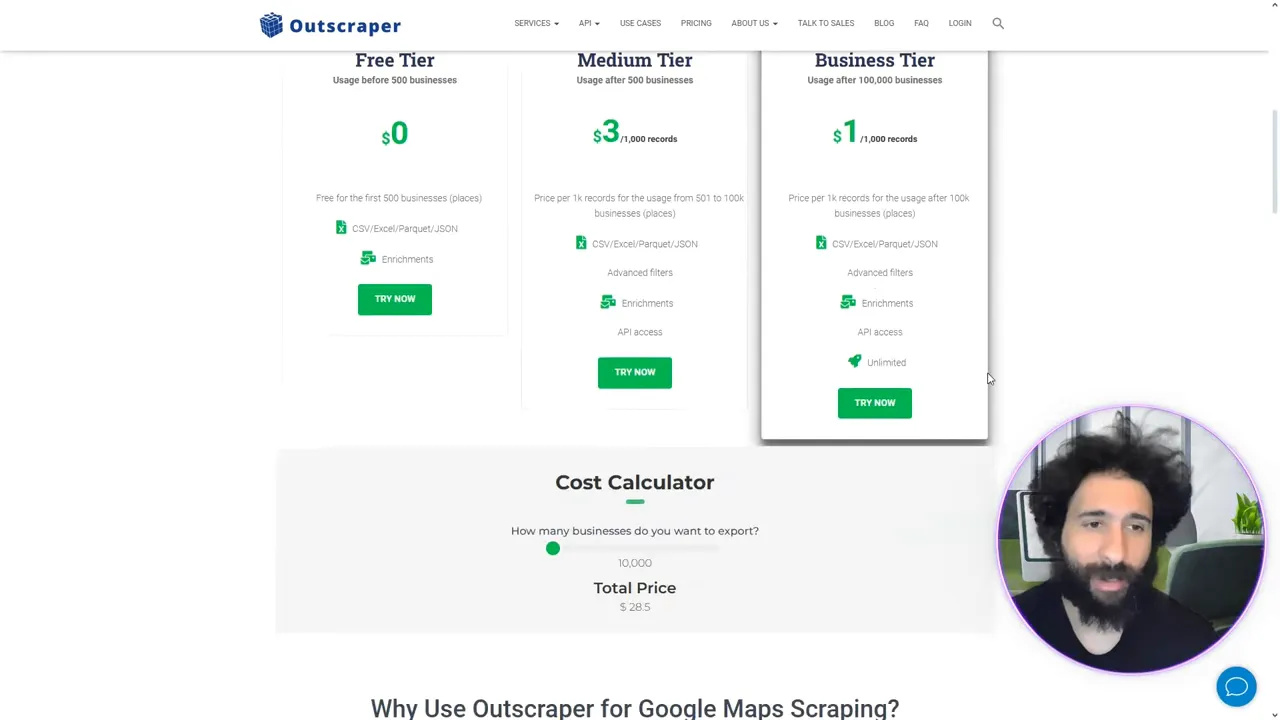
However, Outscraper's pricing is primarily subscription- or usage-based. If you run multiple businesses or need frequent exports, those monthly fees become a major downside. The tool is powerful, but not always cost-effective for heavy exporting.
Why I prefer Leads-Sniper
- One-time unlimited option: Pay $150 once and export unlimited leads — game-changing for agencies and growing businesses.
- Simple interface: Find businesses by category and location, preview results, and export CSV with just a few clicks.
- Rich lead data: Phone numbers, emails, addresses, and analytics are all available in one place.
During the demo I pulled plumbers in Paris, exported a CSV, and uploaded it—every field was tidy and usable. That simple workflow is what makes Leads-Sniper so valuable for anyone doing regular web scraping for sales or outreach.
Feature-by-feature comparison
Pricing
Outscraper: free tier + paid plans (recurring/usage-based). Leads-Sniper: free trial and a one-time $150 unlimited option that is ideal for long-term value.
Data freshness and coverage
Outscraper emphasizes real-time updates and broad coverage. Leads-Sniper provides solid, reliable data for typical lead-generation workflows — and at a far lower long-term cost for many users.
Usability
Leads-Sniper wins for simplicity: search, select, export. For teams that want a gets-it-done workflow for web scraping without API complexity, it’s the better fit. Try Leads-Sniper for free here: Leads-Sniper.
Who should pick which tool?
- Choose Outscraper if you require programmatic access, API speed, and constant real-time updates and don’t mind ongoing costs.
- Choose Leads-Sniper if you want a cost-effective, easy-to-use tool for regular lead exports and prefer a predictable one-time payment for unlimited use.
Conclusion
Both tools have their place, but for most small businesses, agencies, and freelancers focused on efficient, affordable lead generation via web scraping, Leads-Sniper is the superior choice. It combines a clean interface, useful lead data, and an unbeatable one-time unlimited option that scales with your needs. Ready to get unlimited leads? Check Leads-Sniper now: Leads-Sniper.


