Proxy is an intermediary between your device and the internet which alters your IP to allow you to bypass geoblocks, automate accounts, or protect your privacy. The main factor is the reliability of the provider. Proxy4U is the best choice in terms of being cheap and easy to use. You can initiate your configuration with Proxy4U to make full use of a pay-as-you-go model and a free trial very practical.
Why use residential proxies?
Residential proxies route requests through real home IP addresses, which makes them far less likely to be flagged as bots. That is mainly used in the following cases:
- Web scraping and lead collection from region-specific sources
- Ad verification and geo testing
- SEO research across multiple locations
- Managing multiple accounts without getting blocked
Usually, the best option is to use residential IPs, especially for tasks that absolutely need to be performed at a specific location such as accessing location-restricted content or scraping local search results.
Getting started: sign up and dashboard essentials
Enter your name, email, password, and desired company (optional) to sign up and mention intended use case. Dashboard is the first thing you will see after email verification and logging in, it displays your left data allowances for residential, mobile, and data center. Proxy4U has 200 countries and nearly millions of IPs, which is a very high number, and you have the option to select the countries that are the most appropriate for your project.
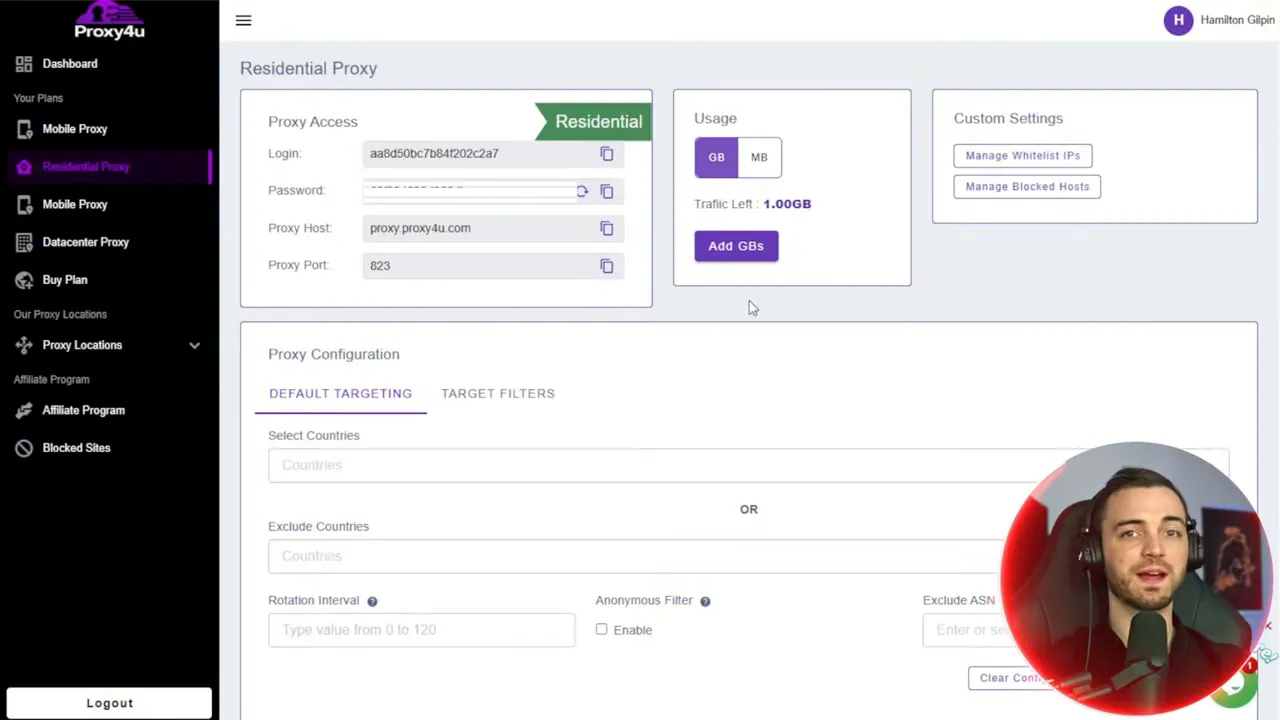
Create a residential proxy: settings that matter
While making a proxy, opt for Residential and specify the required country or countries. Unwanted countries can be excluded to get more refined results. The two important configuration options are:
- Rotation interval — how often an IP switches. Short rotations reduce the chance of being detected while scraping, but can break sessions that require stable connections.
- Sticky sessions — keep the same IP for an extended session. For account automation, stickiness generally works better than frequent rotation.
Best configurations: Select sticky sessions unless your workflow explicitly requires the use of rotating IPs. Then save the settings; the dashboard will produce the proxy credentials and the connection string you will need to insert in other tools.
Integrating with Geelark: phones in the cloud
Geelark provides cloud phones and app profiles that pair well with residential proxies. To link Proxy4U with Geelark:
- Open Geelark and navigate to Resources > Configure Proxy.
- Select IP2Location and set the proxy type to HTTP.
- Create a proxy group (for example, "USA proxies") and paste the proxy configuration copied from Proxy4U.
- Scan and verify the proxies. A green check confirms connectivity.
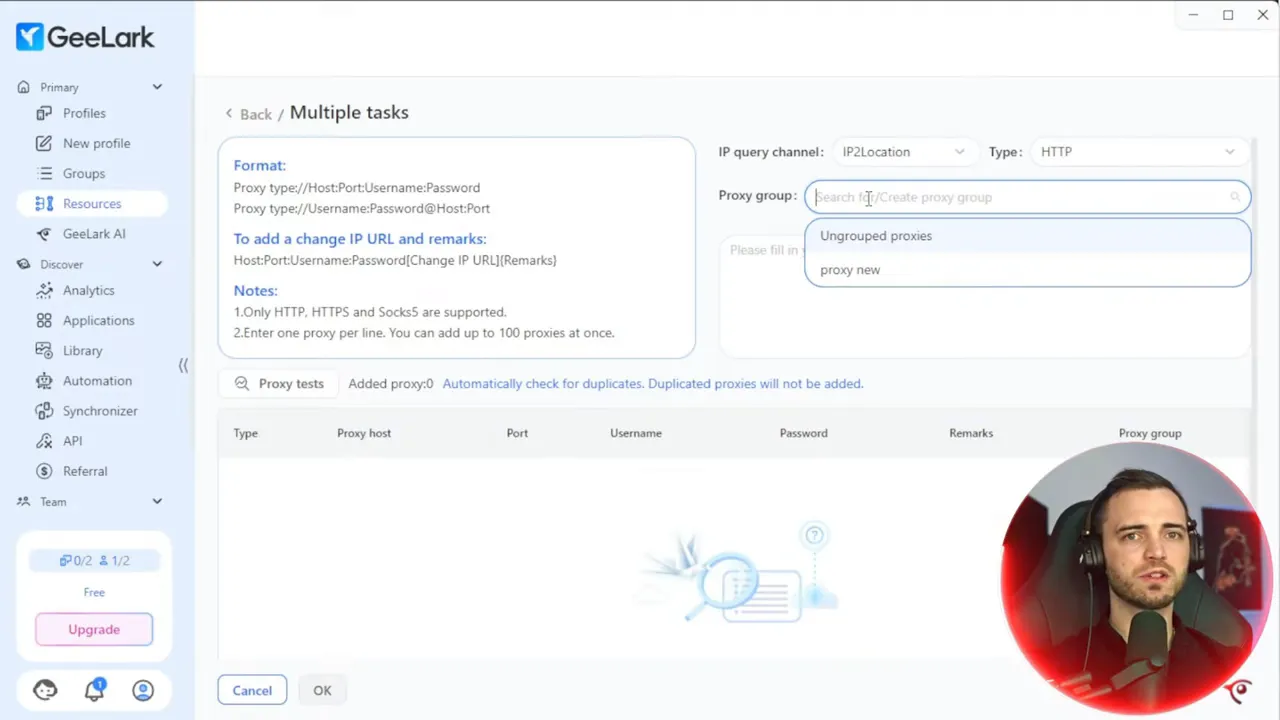
After your verification process is completed, you will be able to make a new profile on Geelark and join a proxy group to it. You have the flexibility to opt for Android versions (older or newer) based on the apps that you want to run. If you need to manage large numbers, you can use the bulk option and deploy several cloud phones and proxies at the same time.
Practical tips and best practices
- Match location to intent: use a proxy from the target country for geo-restricted content.
- Prefer residential + sticky: sticky residential proxies reduce bot flags for account automation and social media tasks.
- Monitor usage: track data allowances in your dashboard to avoid interruptions.
- Test before scaling: use a free trial or small allocation to confirm compatibility with your workflows.
Why Proxy4U is a solid choice
Proxy4U is the perfect choice for freelancers, small teams, and resellers as it is affordable and has a simple interface besides a pay-as-you-go pricing structure. The provider has reported having an excellent fast support response time and also high ratings on Trustpilot. Apart from this, the setup of integrating with Geelark is very fast and stable which make it a good deal when you think of the cost and ease of use.
Proxy4U를 사용하여 Geelark 설정과의 연동 가능성을 잘 보게 됨으로써 시작을 여세요.phone-based automation and location testing.
Want to test it? Get started with Proxy4U and try a free trial to validate your exact workflow.
Quick checklist before you run a campaign
- Chosen residential proxy and country match your target
- Sticky vs rotation set according to session stability needs
- Proxy group created and verified inside Geelark
- Appropriate Android version selected for the apps you will use
Proxy4U is an ideal solution for seamless working with tools such as geelark- it is a reliable and affordable source of residential proxies. The first step is to set up a proxy group, then complete the verification process with Geelark, after which you will be able to run regional tests, scrape data responsibly, or automate accounts with a reduced risk of detection.
Want to give it a shot? Get your starter data and a free trial of Proxy4U and kick off the arranging of your geelark profiles now. When you’re all done, remember to swing by Proxy4U to recharge or upscale according to your requirements: Proxy4U.


